Unstructured Data Extraction Using AI Functions in Dataflow Gen2
Three and a half years ago, in pre-AI age, I wrote a blog post titled “Extracting Matching Words Using A Pre-Defined List in Power Query/M”. I helped a colleague extract certain error codes/phrases from sentences using M. It felt great to wield the M sword. Fast forward to today, you can use the newly announced AI Functions feature in Dataflow Gen2 to achieve the same result using natural language.
Blog: Extracting Matching Words Using A Pre-Defined List in Power Query/M | Sandeep Pawar
Following the same example I shared in the blog above, I wanted to extract certain keywords (programming languages) from text. In M, I split the text and did list lookup to find the matching words.
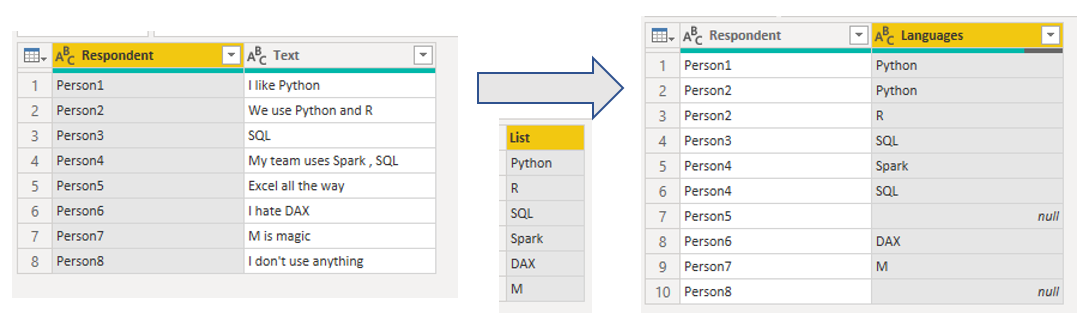
Fabric AI Prompt:
This shouldn’t need much explanation. Similar to AI Functions in Fabric, you specify the column, enter the prompt and let the LLM do the work.
Here is the prompt I used : Extract any programming, query, or scripting languages mentioned (including those used in BI tools such as M, LOD ). Comma-separate if multiple. NA if none or unsure

Result:

Give it a try:
let
    Source = #table(
        type table [Respondent = text, Text = text],
        {
            {"Person1", "I like Python"},
            {"Person2", "We use Python and R"},
            {"Person3", "SQL"},
            {"Person4", "My team uses Spark , SQL"},
            {"Person5", "Excel all the way"},
            {"Person6", "I hate DAX"},
            {"Person7", "M is magic"},
            {"Person8", "I don't use anything"},
            {"Person8", "I learned MDX before DAX and still use MDX for our SSAS cubes "}
        }
    ),
  #"Renamed columns" = Table.RenameColumns(Source, {{"Text", "quote"}}),
  #"Added AI prompt column" = Table.AddColumn(#"Renamed columns", "language", each FabricAI.Prompt("Extract any programming, query, or scripting languages mentioned (including those used in BI tools such as M, LOD ). Comma-separate if multiple. NA if none or unsure", Record.SelectFields(_, {"quote"})), type text)
in
    #"Added AI prompt column"
Instead of the UI, you can also use FabricAI.Prompt M function. Note that this function is not available in Power BI Desktop.
Read the documentation for more details: Fabric AI Prompt in Dataflow Gen2 (Preview) - Microsoft Fabric | Microsoft Learn
About the author
Principal Program Manager, Microsoft Fabric CAT helping users and organizations build scalable, insightful, secure solutions. Blogs, opinions are my own and do not represent my employer.
Comments
Join the discussionNo comments yet. Be the first to comment.