Programmatically Control Copilot access for semantic models
In the flood of announcements at FabCon Barcelona, you may have missed this feature our customers and users have been asking for - controlling Copilot/AI access to semantic models. Previously, if you had a semantic model which has not been prepared for AI, a user could still use it in Copilot or data agent which can affect response accuracy and experience. Now you can control if read-only users can see/use a semantic model in Copilot or data agent.
You can watch the demo by my colleague Jacinda Eng below:
https://youtu.be/8f_PrrtbIOM?si=PlVCJ2UoZqJw0BZy&t=1214
If you have write permissions to the semantic model, you can toggle it on/off in the semantic model settings.
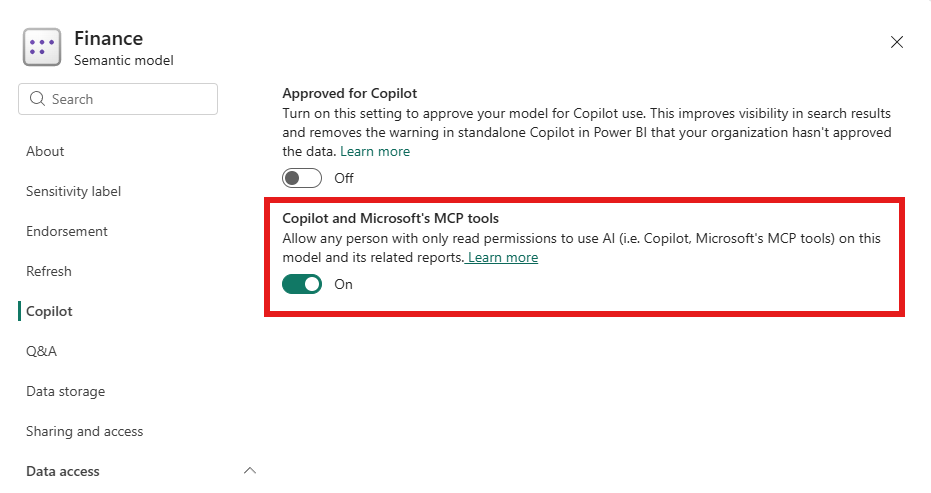
Read the documentation for more details.
Programmatic approach
If you have write access to the semantic model, you can use SemPy to toggle this setting in a Fabric notebook.
import sempy.fabric as fabric
from sempy.fabric import PowerBIRestClient


def build_client():
    """A client that takes a fresh notebook token on every request.

    The settings endpoint rejects sempy's default credential with a 401, so the
    token has to come from notebookutils explicitly.
    """
    try:
        import notebookutils  # noqa: F401
        import base64
        import json
        from azure.core.credentials import AccessToken

        class Cred:
            def get_token(self, *scopes, **kwargs):
                token = notebookutils.credentials.getToken("pbi")
                payload = token.split(".")[1]
                payload += "=" * (-len(payload) % 4)
                exp = int(json.loads(base64.urlsafe_b64decode(payload))["exp"])
                return AccessToken(token, exp)

        return PowerBIRestClient(credential=Cred())
    except ImportError:
        return PowerBIRestClient()


client = build_client()


def allow_copilot_for_readers(workspace, dataset, allow=True, apply_changes=False):
    """Read or update whether read-only users may use Copilot on one model.
    apply_changes=False: return the current setting, changing nothing.
    apply_changes=True: allow=True lets readers use Copilot (portal toggle, allow=False blocks it (toggle Off).


    """
    workspace = fabric.resolve_workspace_name(workspace)
    dataset = fabric.resolve_dataset_name(dataset, workspace)

    item = fabric.get_item(
        dataset,
        item_type="SemanticModel",
        workspace=workspace,
        return_dataframe=False,
    )
    body = client.get(
        f"https://api.powerbi.com/v1.0/myorg/groups/{item['workspaceId']}/datasets"
    ).json()
    cluster = body["@odata.context"].split("/v1.0")[0]

    meta = client.get(f"{cluster}/metadata/models/{item['id']}").json()
    model = meta["model"]
    switches = meta.get("featureSwitches") or {}
    result = {
        "workspace": workspace,
        "model": dataset,
        "settings": f"{cluster}/metadata/models/{model['id']}/settings",
        "allowCopilotForReaders": switches.get("restrictCopilotForReaders"),
        "status": "read",
        "detail": "" if "restrictCopilotForReaders" in switches else "not in featureSwitches",
    }

    if apply_changes:
        try:
            client.post(
                result["settings"],
                json={"restrictCopilotForReaders": not allow},
            )
            result["allowCopilotForReaders"] = not allow
            result["status"] = "updated"
        except Exception as e:
            result["status"] = "failed"
            result["detail"] = f"{type(e).__name__}: {e}"
    return result
By default this setting is toggle on. To restrict:
allow_copilot_for_readers("<workspace id/name>", "dataset id/name", allow=False, apply_changes=True)
After restricting, for read-only users:
any reports using this semantic model will not be discoverable from Microsoft Copilot and cannot be queried from Copilot
they will not be able to use report Copilot on report using this semantic model
they will not be able to use the semantic model in data agent
This is a great way to enforce AI governance.
Thanks to my colleagues Jacinda Eng and Darren Gosebell for their inputs and help.
About the author
Principal Program Manager, Microsoft Fabric CAT helping users and organizations build scalable, insightful, secure solutions. Blogs, opinions are my own and do not represent my employer.