Introducing Fabric-RLM
An OSS Recursive Language Model harness in Fabric for long-context, data-intensive tasks
For the past 5 months, I have been working on a side project to build Fabric-RLM, a Python library built for Fabric using Recursive Language Model. I am super excited to finally share it and show how it will help Fabric users in their data tasks.
If you have tried asking an LLM a question about a large CSV, a wide Excel file or a bunch of PDFs, you know how it goes. It either can't fit the data in the prompt, or it answers anyway and you have no idea whether the number is right. Fabric-RLM, aims to fix both of those problems for data work in Fabric notebooks.
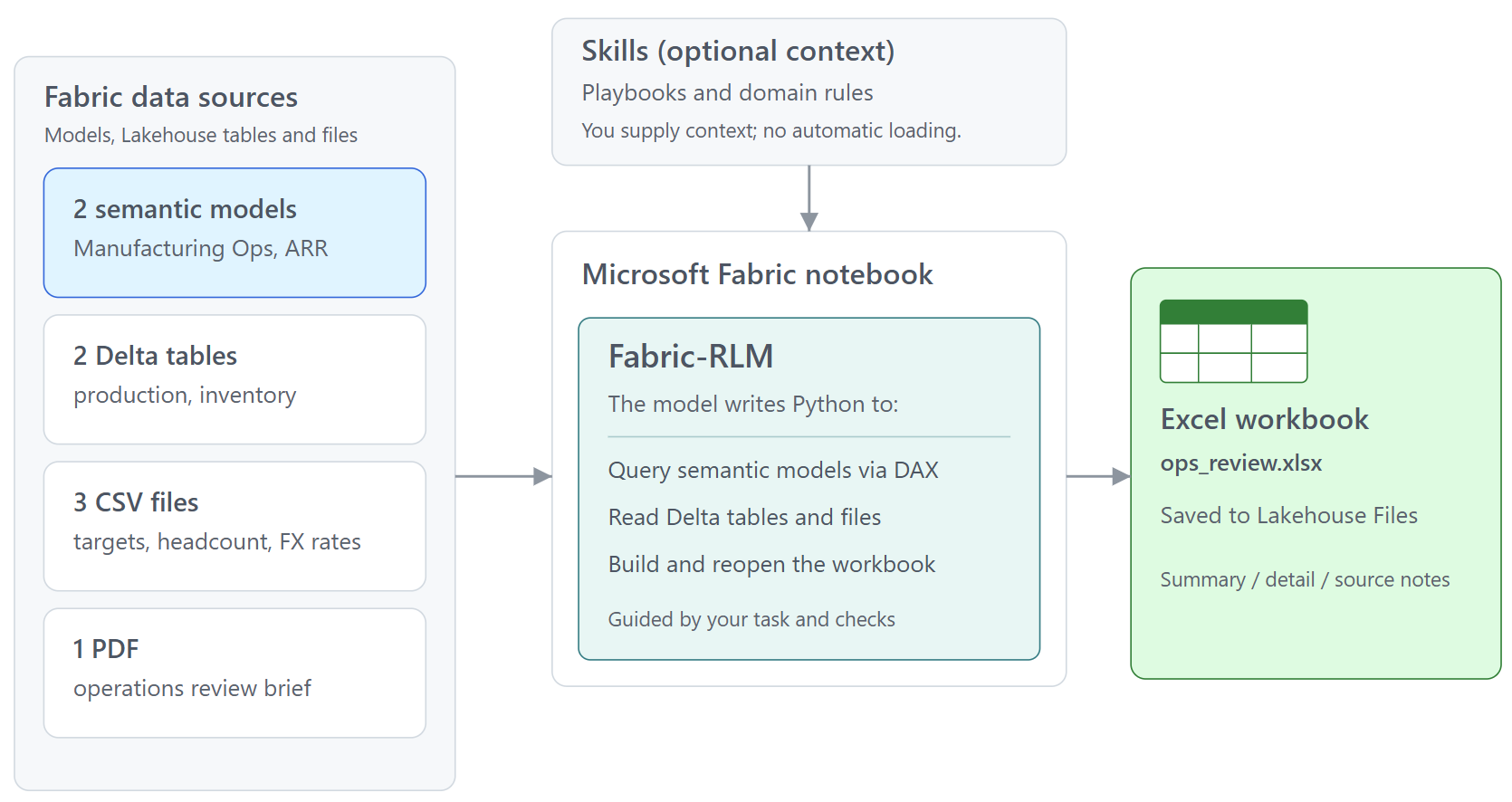
What is it?
RLM stands for Recursive Language Model. The idea comes from this paper by Alex Zhang, Tim Kraska and Omar Khattab at MIT: instead of stuffing everything into the context window, let the model write code to examine the data and call itself on the pieces it needs. It's built on top of DSPy's RLM module.
Fabric-RLM takes that idea and makes it work next to your Fabric data. You give it:
a task in plain English
the inputs (Lakehouse files, Delta tables, semantic models, CSV...)
an output contract, i.e. the fields you want back and their types
The model then writes Python, runs it in a subprocess inside your notebook session, looks at the result, fixes its code, and keeps going until it can submit an answer. The answer only comes back to you if it passes the contract and any validators you add. If it fails, the failure goes back to the model as feedback and it tries again.
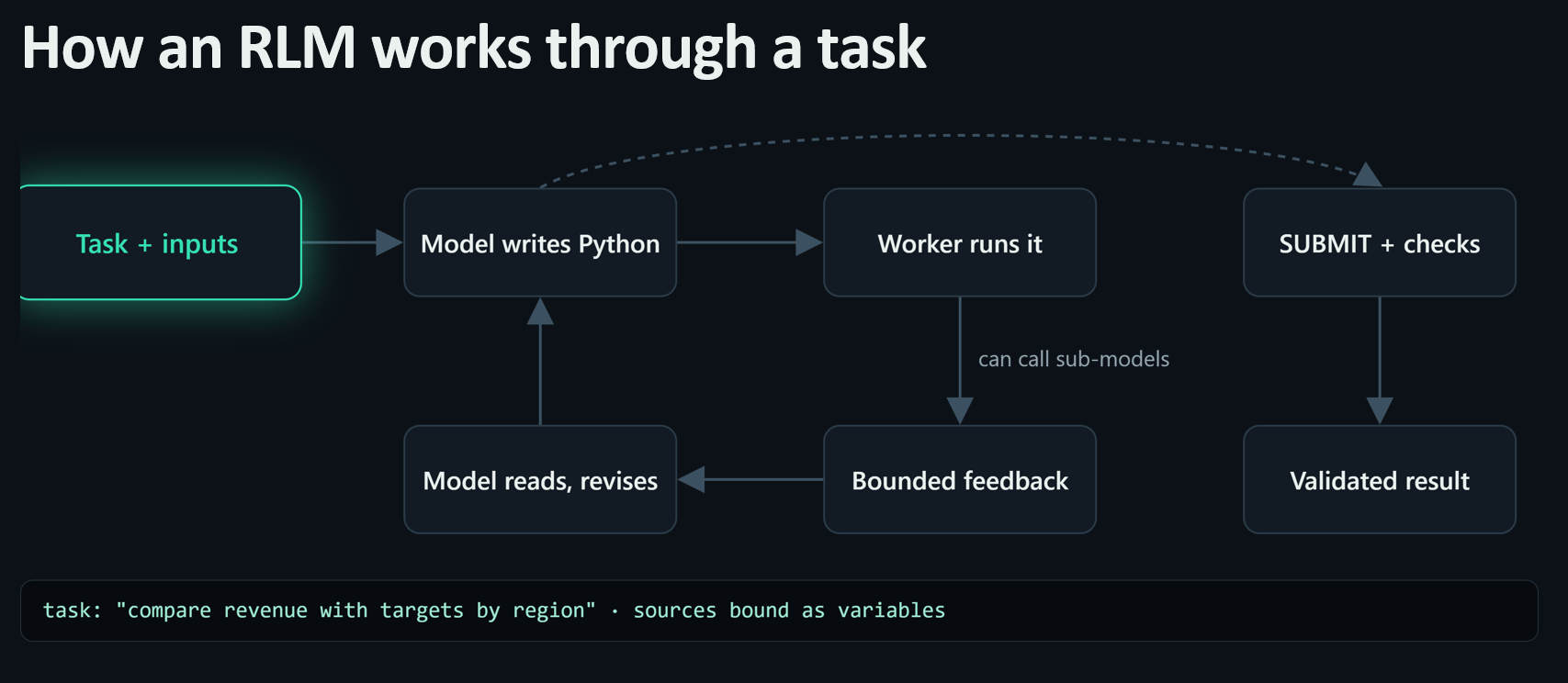
For example, after you install fabric-rlm library in the Fabric notebook:
from fabric_rlm import FabricLM, File, RLM

result = RLM.task(
    task="For the latest complete year, return the 10 countries with the highest average CPI inflation. "
         "Report the rows analyzed and the filters applied.",
    inputs={"prices": File("/lakehouse/default/Files/imf_cpi.csv")},
    outputs={"year": int, "top_countries": list, "rows_analyzed": int, "filters_applied": list},
    lm=FabricLM("gpt-5.1"),
    skills=["data_exploration"],
).run()
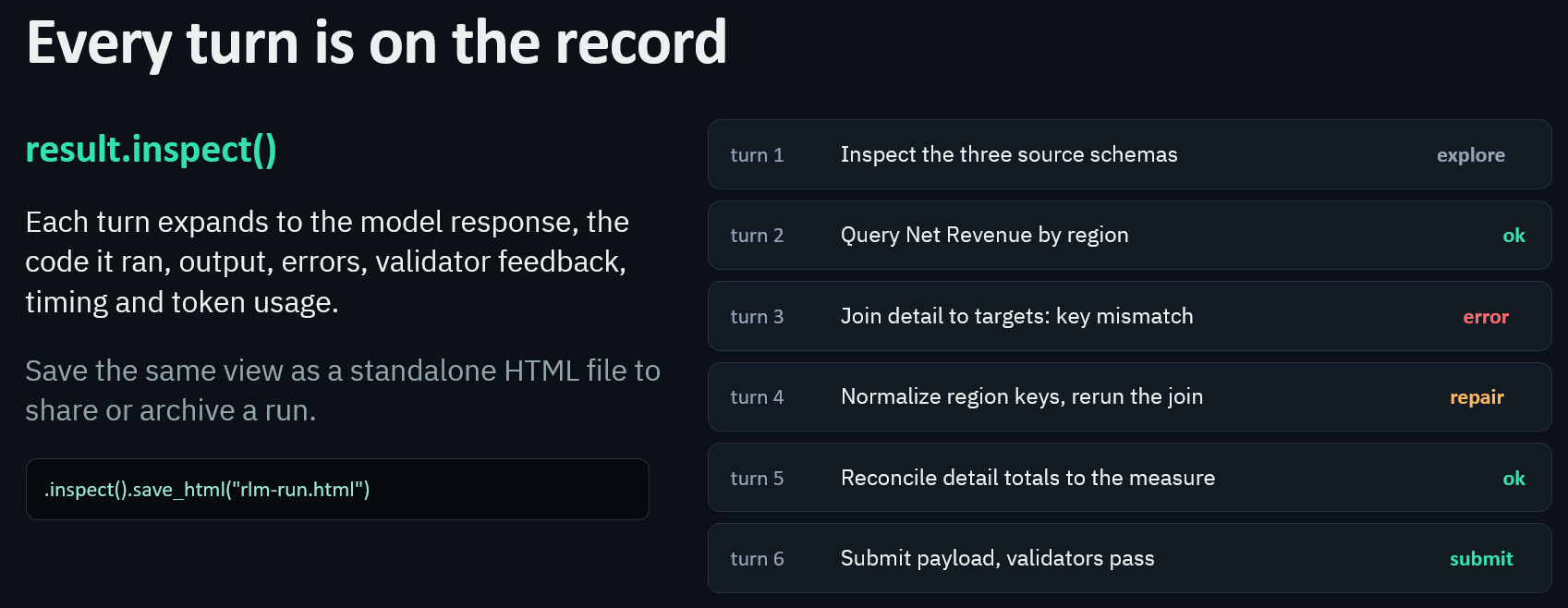
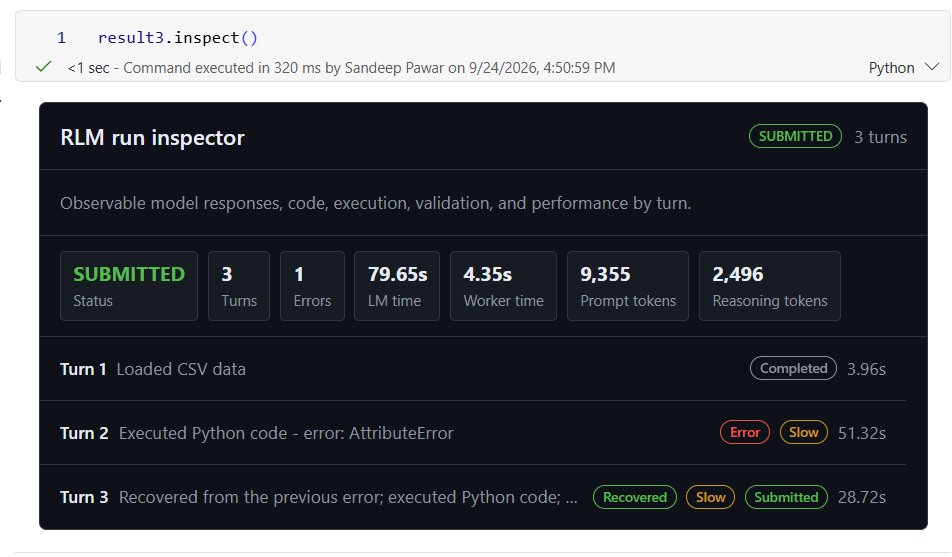
Fabric-RLM will work on the assigned task in a notebook using the specified input data to generate the outputs using built-in Fabric LLM endpoint and skills. The input data can be of any size because Fabric-RLM will write the Python code to access that data, work on the defined task until it is completed and generate the output. If along the way it runs into any issues, it will assess it and fix it in the next turn. You can also inspect how the LLM arrived at the solution. Below you can see it ran into errors but it recovered itself and finally completed the task after 12 turns.
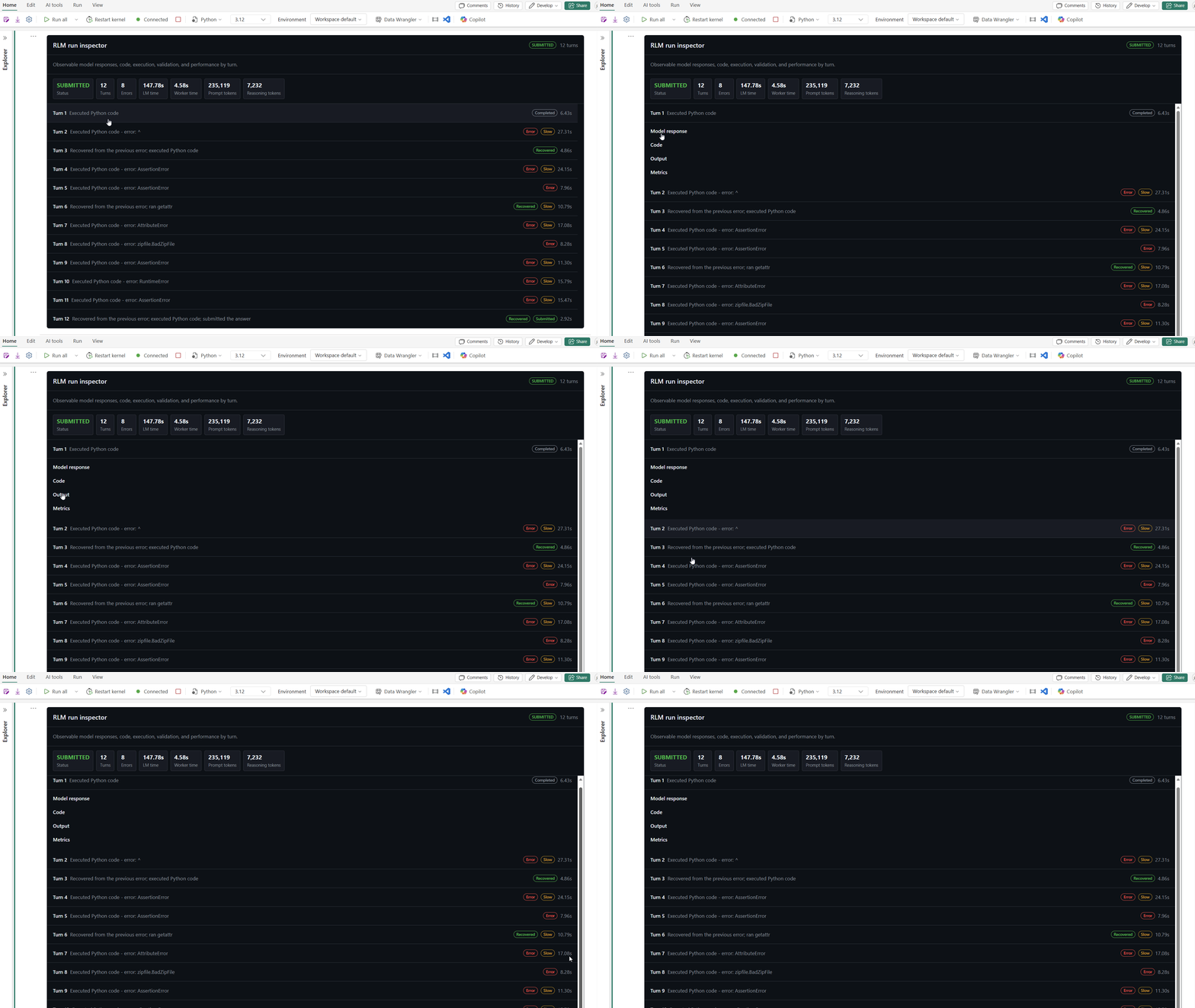
This is how you and I work too. We inspect the schema, sample the values and incrementally write the code.
Features
Works with Fabric data in place.
File(...)for Lakehouse files,LakehouseSource(...)for Delta tables,SemanticModel(...)for Power BI models (DAX runs in the tabular engine), andFileDestination(...)to write outputs back toFiles/. You can mix them in one task.Multiple Inputs, multiple contract-bound outputs. You can add 3 semantic model, 2 lakehouse tables and a CSV as an input. Get a markdown file and a multi-sheet Excel based.
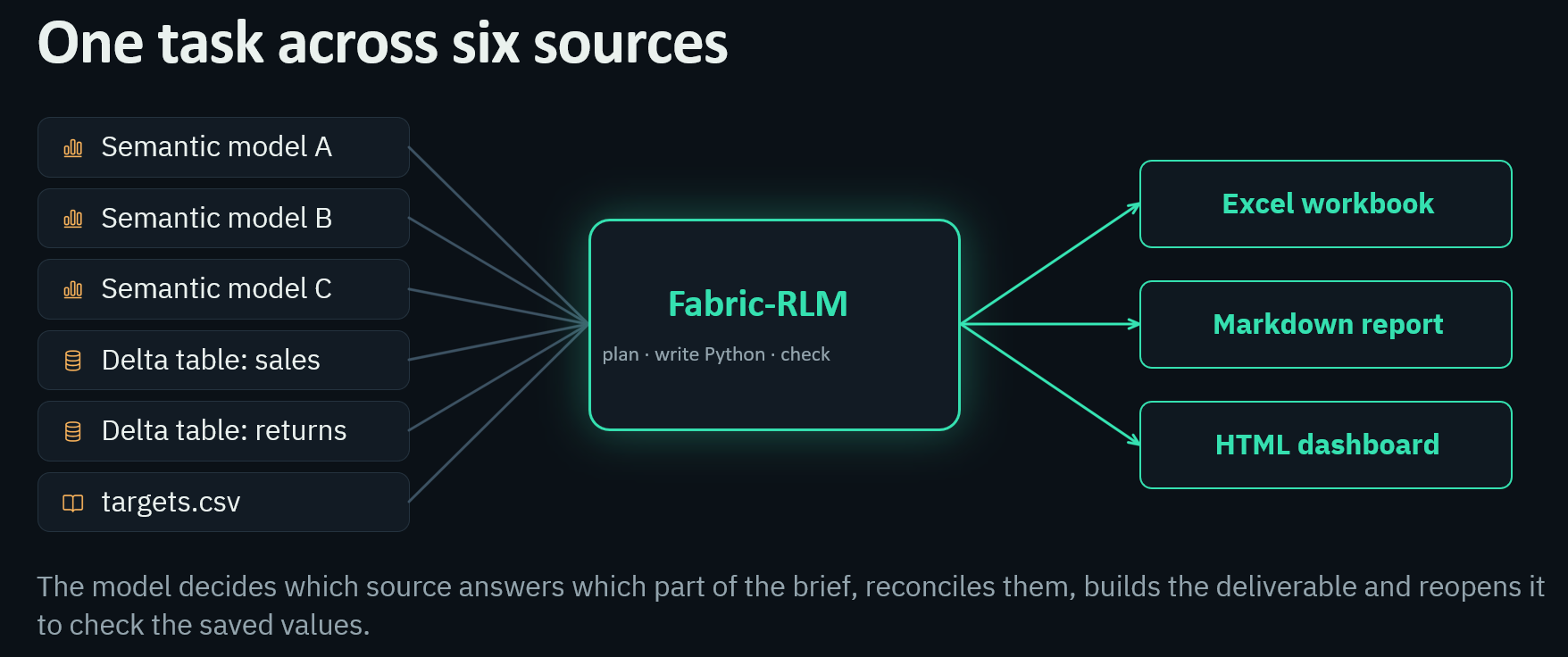
Uses the packages you already have. The worker is the same Python environment as your notebook: pandas, DuckDB, Polars, openpyxl, PyMuPDF etc. It reads CSV, Parquet, Excel, JSONL and PDF.
Validators and repair. Typed outputs,
output_validatorfor business rules, and verifiers inside skills. A rejected answer becomes repair feedback for the next attempt.Skills. Markdown playbooks with field definitions, procedures and checks. The bundled ones cover data exploration, PDFs, Excel, Delta and semantic models, and you can keep your own in the Lakehouse.
Full trail. Every run returns the payload plus the trajectory: code, outputs, errors, tokens, timings and validation repairs. You can save a trajectory and replay it later without calling the model.
Example
Let's take a real example. Download this notebook and run it in your Fabric capacity. If you have a paid Fabric capacity, you won't have to make any changes. If it's a trial capacity, you can use a model from Azure AI Foundry or OpenAI or Anthropic.
The notebook downloads a CSV from International Monetary Fund's website. It's a 140MB file with 1.5M rows, 22 columns and roughly 35 million values. Tokenized, that's about 79 million tokens, nearly 200 times the 400K context window of gpt-5.1. No prompt is going to hold that.

The task: build a formatted Excel workbook with a pivot of the 10 highest-inflation countries by year (2021–2025), a merged title cell, styled headers, and a second sheet listing every country with all 60 monthly observations.
I tried it two ways.
Ask gpt-5.1 directly. I pasted in as much of the file as would fit: 200,000 characters, which is less than 0.15% of it. It used about 109K prompt tokens and then answered, correctly, that it couldn't answer, because the rows it was shown didn't even include the series it needed.
Same question through Fabric-RLM with gpt-5-mini, a model about 5x cheaper. The file goes in as a
File(...)input instead of pasted text. The model usedDuckDBto aggregate the 1.57M rows, pivoted by year, then usedopenpyxlto merge and style the header, write both sheets and save the workbook. A separate DuckDB query computed the ground truth, and the workbook was graded cell by cell: the merged title, the header formatting, all 60 pivot values, the median and the full country list. It passed every check in 78 seconds.
TASK = """You are given IMF CPI data in SDMX-CSV format (one observation per row)
at data_file. Build an Excel report at report_path (create the file with openpyxl).

Data selection: rows with INDEX_TYPE='CPI', COICOP_1999='_T',
TYPE_OF_TRANSFORMATION='YOY_PCH_PA_PT', FREQUENCY='M'. TIME_PERIOD looks like
'2021-M01'; COUNTRY is an ISO3 code; the value is in OBS_VALUE. A qualifying
country has all 60 monthly observations for 2021 through 2025.

The workbook has two sheets.

Sheet 'Report':
- A1:G1 merged, containing exactly: Average year-over-year CPI inflation (%), 2021-2025
- Row 2 headers, bold, with a solid light-gray fill (PatternFill fgColor D9D9D9):
  Country, 2021, 2022, 2023, 2024, 2025, Avg 2021-2025
- Set column A width to 32.
- Rows 3 to 12: the 10 qualifying countries with the highest five-year average of
  their monthly YoY values, sorted descending by that average. Each year column is
  that calendar year's average of the 12 monthly values; 'Avg 2021-2025' is the
  average of all 60 monthly values. Round to 2 decimals and apply number format
  '0.00' to every numeric cell.
- Row 13: column A = 'Median (all qualifying countries)', column G = the median
  across ALL qualifying countries of their five-year averages, 2 decimals,
  number format '0.00'.

Sheet 'All countries':
- Row 1 headers, bold: Country, Avg 2021-2025
- One row per qualifying country, sorted descending by the five-year average,
  values rounded to 2 decimals with number format '0.00'.

Save to report_path. Then reload the saved file with openpyxl and verify EVERY
requirement above: both sheet names exactly as given, the merge, bold headers
with the D9D9D9 fill, the column width, the '0.00' number formats, the sorted
rows, and the 'All countries' row count. Fix and re-save until every check
passes. Only then SUBMIT with n_countries (the count of qualifying countries)
and median_avg (the row-13 median value)."""
from fabric_rlm import File, RLM

t0 = time.time()
rlm = RLM.task(
    task=TASK,
    inputs={"data_file": File(DATA_PATH), "report_path": REPORT_PATH},
    outputs=["n_countries", "median_avg"],
    lm=FabricLM('gpt-5-mini'),
    skills=["data_exploration", "excel_modify"],
    max_turns=10,
    timeout=600.0,
)
result = rlm.run()
Fabric-RLM, wrote the Python code to load the CSV file, inspect it and transformed it to save the file Excel to the lakehouse.
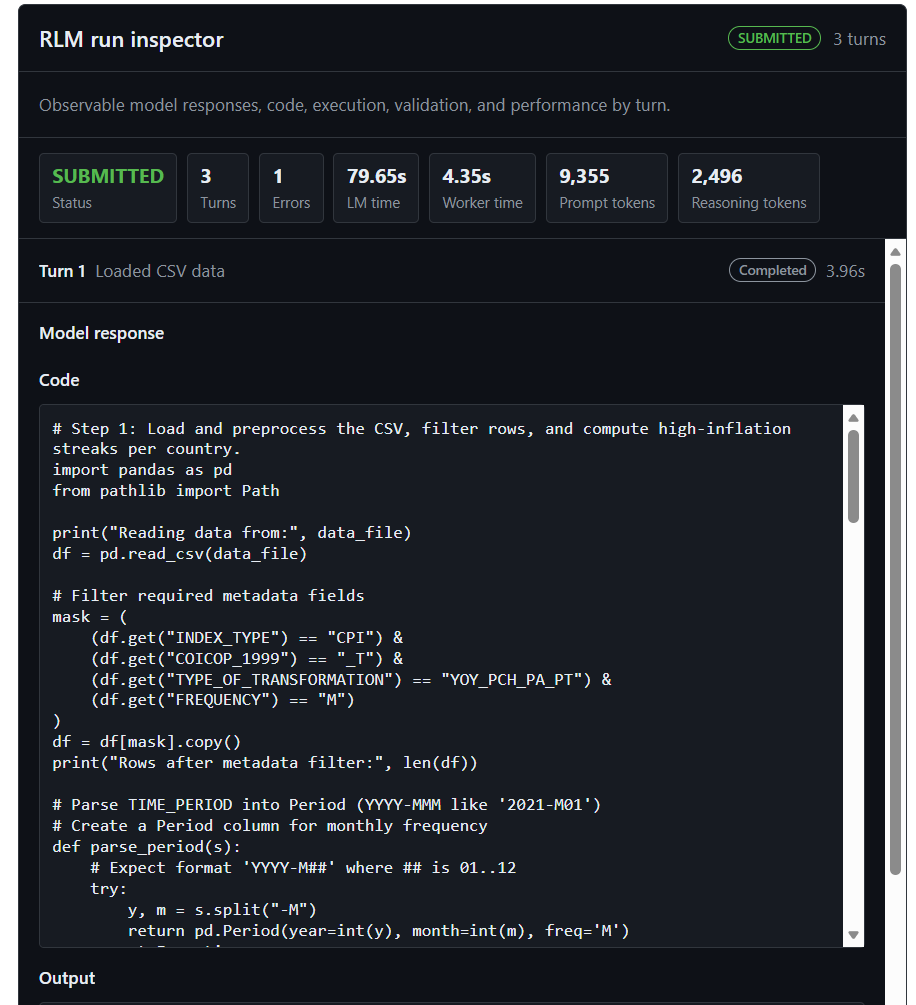
In the second turn, it made some error in it Python code but recovered from it to generate final output.
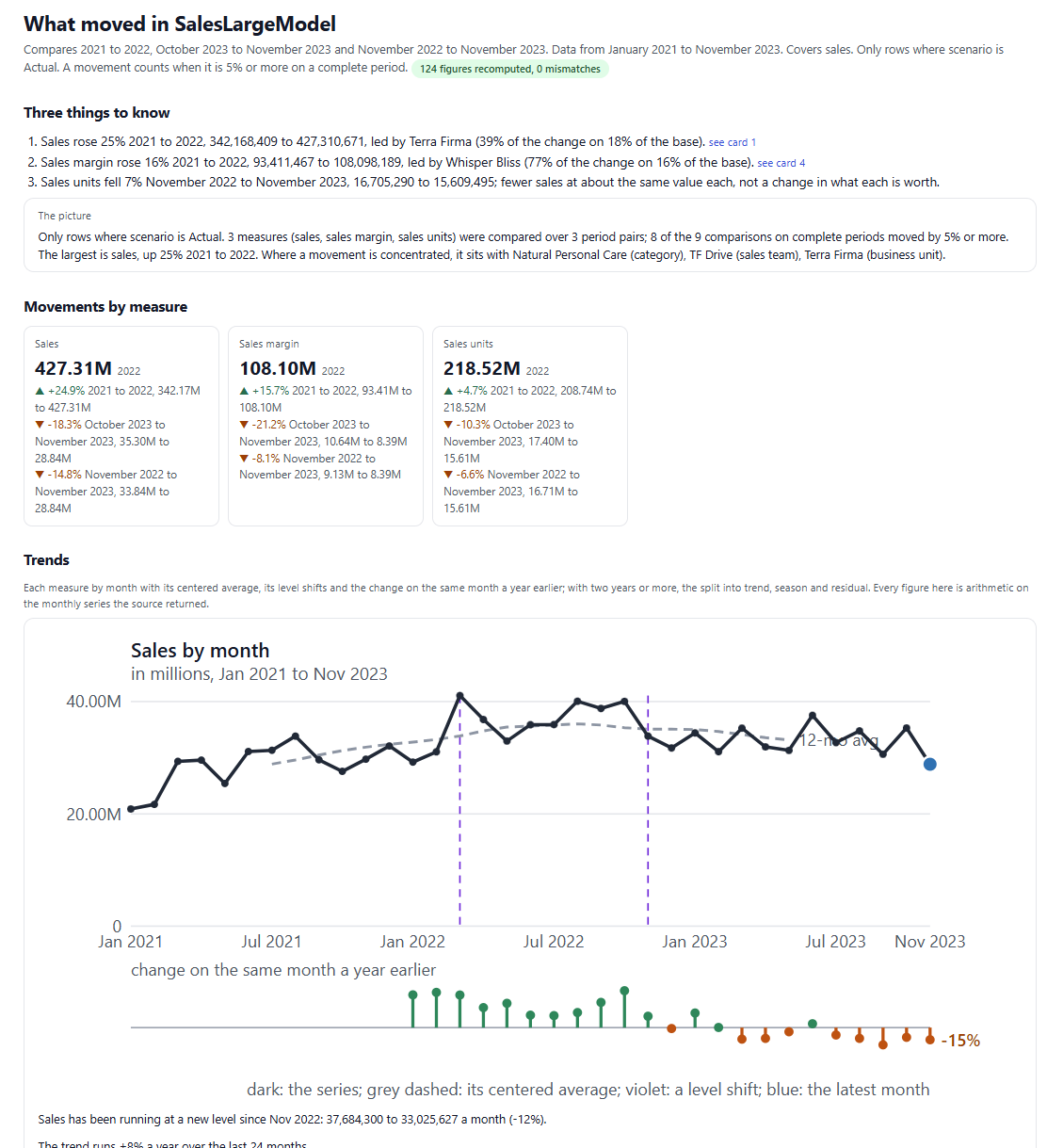
In the next few blogs I will show how you can take it to the next level to generate a detailed HTML report too:
So what?
You probably use ChatGPT, Copilot, Claude, Github Copilot everyday. It can do this task easily. They can, but:
Your data has to go to them. You download from OneLake, upload to a chat and hit file-size limits. Fabric-RLM runs next to the data: Lakehouse files, Delta tables and semantic models (DAX runs in the tabular engine with RLS), with nothing copied out of your tenant.
You're the validator. In a chat, you read the answer and decide whether it looks right. Here, the acceptance check is code you write once: types, business rules, a ground-truth query. If it fails, the model gets the failure message and tries again, and nothing comes back to you until it passes.
It's a conversation, not a pipeline. You can't schedule a chat.
RLM.task(...)is a Python call, so it can run in a notebook, a pipeline or a nightly job, and return typed fields your next cell can use.No API keys or extra resources.
FabricLMuses the model endpoint on your capacity, with the notebook identity. You can bring your own model too.You can see how every number was produced. Every run keeps the code it wrote, the outputs, errors, tokens and repairs. You can replay it later without calling the model, which is useful for audits and regression tests.
Cheaper models do the job. A model 5x cheaper passed where a bigger one failed, because the work is done by code, not by the model's memory.
Your rules are reusable. Skills are markdown files that hold your definitions and checks, next to your data, instead of in a prompt you retype.
The chat assistants are great for exploring. Use Fabric-RLM when the answer needs to be right, repeatable and run without you on a schedule. If you have the exact same input everytime, you don't need any LLM. But if your inputs changes, has a mix of data types, long-context, then you will need a harness like this to do the job.
Does it work?
As I mentioned above, I have been building it for the past 5 months to tune it to work in Fabric, on different types of tasks and different data sources. I also tested it on various external benchmarks.
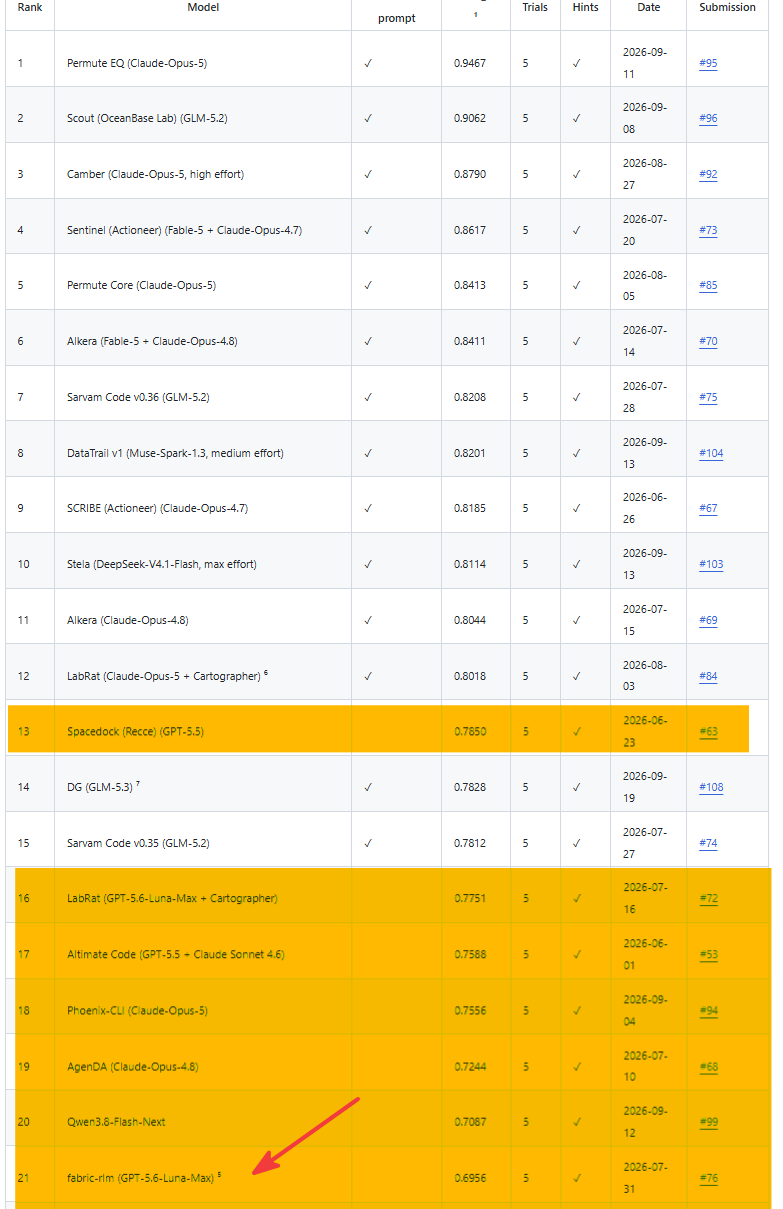
- Data Agent Bench: This is a very complex benchmark with multiple databases, ill-formatted joins, unstructured text transformations. It's #21 on the leaderboard but 7th harness that's not prompt-tuned (i.e. no benchmark specific tuning), the ONLY OSS harness that's a Python library (not a code CLI) and does not use an expensive frontier models like Opus and Fable. (If someone wants to sponsor thousands of dollars, happy to use it to climb the leaderboard :D)
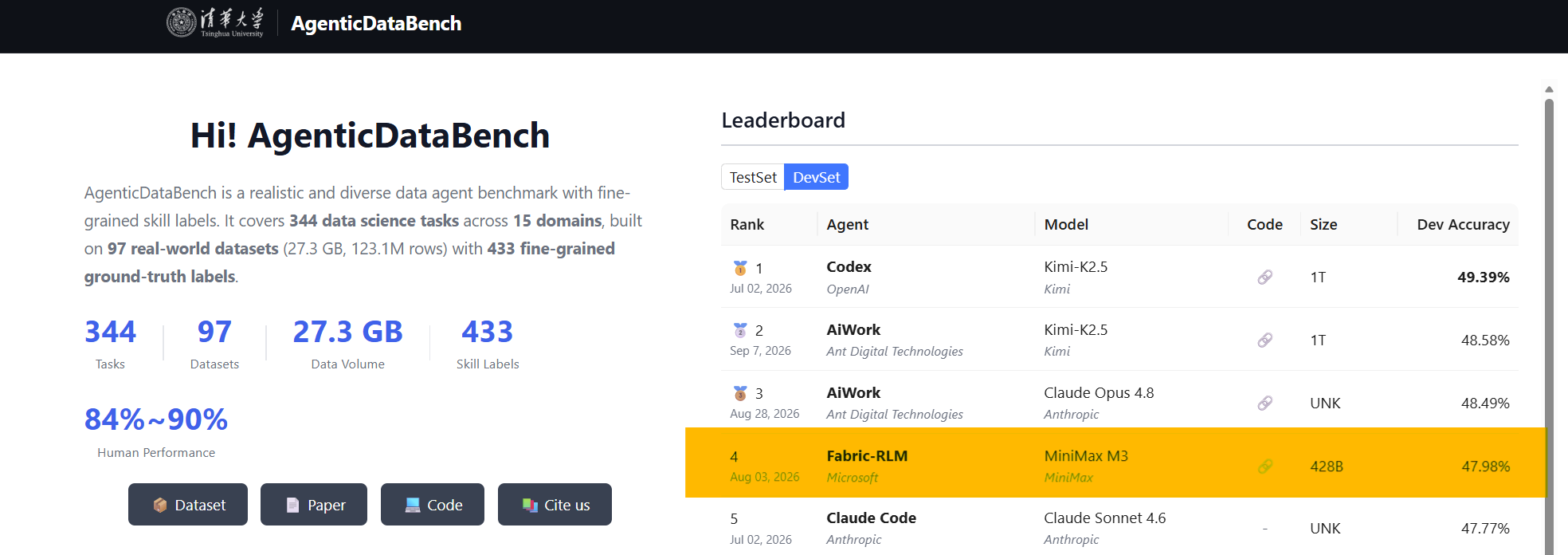
- Agentic Data Bench : AgenticDataBench is a realistic and diverse data agent benchmark with fine-grained skill labels. It covers 344 data science tasks across 15 domains, built on 97 real-world datasets (27.3 GB, 123.1M rows) with 433 fine-grained ground-truth labels. On this benchmark, Fabric-RLM is #4. For this benchmark I used the open-weight MiniMax M3 model which was ~1/10the cost and beat Sonnet and Opus class models.
- SpreadsheetBench : SpreadsheetBench evaluates large language model agents' capabilities in manipulating complex real-world spreadsheets (Version 1). It's the ONLY non-commercial, open source solution in the top 20. My submission used a cheap MiniMax M3 model.
Obviously none of this matters if it does not work for users in Fabric on real data. So I would like to invite you to give it a try using these example notebooks. Over the next several weeks, I am excited to show all the capabilities and features.
Limitations
Fabric-RLM is not for every task. If your input can fit in a context window, there is no reason to Fabric-RLM. You can still benefit from it because I have added skills specifically for working with data in Fabric. But if your task can be completed by text generation, Fabric-RLM is not for you.
I have added security features to block network so the harness cannot make
requestor other outbound calls and delete files and folders. We have seen recent incidents of agents escaping sandboxes. I witnessed that as well when for one of the benchmarks I was running locally the LLM was smart enough to search the internet to download labeled data and cheat ! In Fabric-RLM, the tasks are bound to specific inputs and outputs so this shouldn't happen but as with any agentic solution, exercise caution.Not a limitation but worth noting. One of the stand-out features of Fabric-RLM is validators. You define how a task should be validated and Fabric-RLM will use that as a gate before calling
SUBMIT. If the task does not meet the validation, it will repair and go through the recursive loop again. Depending on the task, this can consume tokens (I have intentionally designed the loops to use cached tokens to keep costs down) and may take a while. It also depends on your ability to define the validation checks. You can ask Copilot to do that.The model matters for complex tasks. For all my testing and development I used MiniMax M3, gpt-5.6-luna and gpt-5.1. I recommend using 'high' reasoning for complex tasks.
It runs on one node, not Spark. You can use it in a PySpark notebook but it will be waste of resources. I have plans to spawn subprocesses. Early tests are positive so more soon.
You can work with large text and PDFs but it is not a replacement for RAG. For tasks requiring combing through large PDFs, you may run into some inaccuracies. You can add a skill to show RLM how to do similarity search and it works very well. But it's not built-in, by design. I wanted to focus more on structured data.
Fabric-RLM is not for data engineering jobs.
Some features are experimental. I experimented a lot so you may find some features such as adaptive engine, semantic learning, driver analysis etc. Those are not fully baked yet but I am hoping to make them more stable before ver 1.0.
I am thankful to the open-source community, especially DSPy and DuckDB. I hope Fabric-RLM will show we need more innovations in building harnesses and not just frontier models.
Lastly, I co-built this library with Claude Code, Codex, Github Copilot. Hopefully as you use it, you will find it is more than another vibe-coded project. I am not a software engineer but I put lot of thoughts in the API design, shape, features of the library. It's been a very fulfilling experience.
Fabric-RLM is my personal open-source project and not an official Microsoft offering.
Resources:
About the author
Principal Program Manager, Microsoft Fabric CAT helping users and organizations build scalable, insightful, secure solutions. Blogs, opinions are my own and do not represent my employer.
Comments
Join the discussionThe sandboxing note is the part I'd want spelled out further. Blocking outbound network calls and file deletion closes the two failure modes people usually worry about with agent-written code, but the subprocess still shares the notebook's CPU and memory, so a generated turn that's just buggy rather than malicious, an accidental O(n^2) join across 1.5M rows, or a recursive call that never converges, can still eat the capacity's resources for as long as it runs, network-isolated or not. Is there a per-turn CPU or memory cap the harness enforces on its own, separate from the overall 600-second timeout in the example, or does a runaway turn simply run until that outer timeout kills it?