Quick Tip : Using NotebookUtils To Get Fabric Lakehouse Properties
This is especially useful for getting the SQL Endpoint connection string
Notebookutils in Fabric now has getWithProperties() method to get the properties of a lakehouse. Earlier the get() method only returned abfs path and not the SQL endpoint.
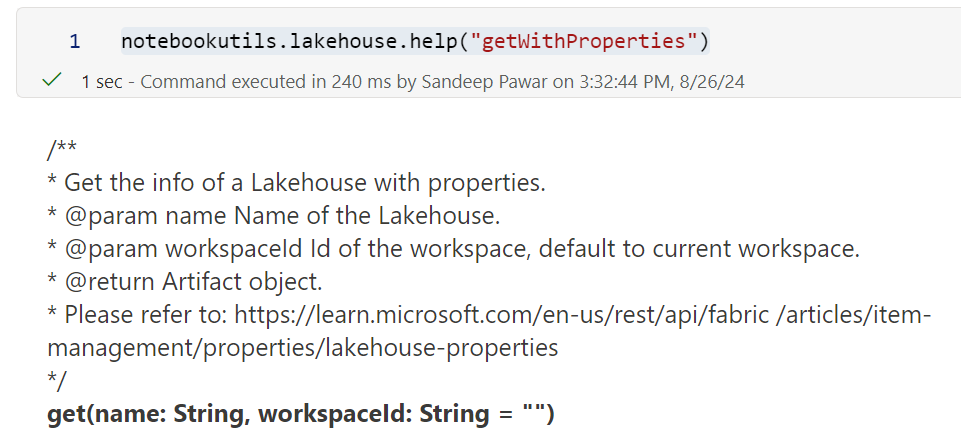
By default it returns the JSON:
//sample output

{'id': '<>',
 'type': 'Lakehouse',
 'displayName': '<name>',
 'description': '',
 'workspaceId': '<>',
 'properties': {'oneLakeTablesPath': 'https://onelake.dfs.fabric.microsoft.com/<>/<>/Tables',
  'oneLakeFilesPath': 'https://onelake.dfs.fabric.microsoft.com/<>/<>/Files',
  'sqlEndpointProperties': {'connectionString': '<>.datawarehouse.fabric.microsoft.com', 'id': '<>', 'provisioningStatus': 'Success'},
  'abfsPath': 'abfss://<>@onelake.dfs.fabric.microsoft.com/<>'}}
Below script normalizes the JSON to a pandas df:
import pandas as pd
import sempy.fabric as fabric

def lakehouse_properties(lakehouse_name, workspace=None):
    """
    Sandeep Pawar | fabric.guru
    Returns properties of a lakehouse as a pandas df.
    Default workspace is used if workspace is None.

    """
    workspace = fabric.resolve_workspace_id(workspace) or fabric.get_workspace_id()

    # Get the Lakehouse data
    data = notebookutils.lakehouse.getWithProperties(name=lakehouse_name, workspaceId=workspace)

    flattened_data = {
        'lakehouse_id': data['id'],
        'type': data['type'],
        'lakehouse_name': data['displayName'],
        'description': data['description'],
        'workspaceId': data['workspaceId'],
        'oneLakeTablesPath': data['properties']['oneLakeTablesPath'],
        'oneLakeFilesPath': data['properties']['oneLakeFilesPath'],
        'abfsPath': data['properties']['abfsPath'],
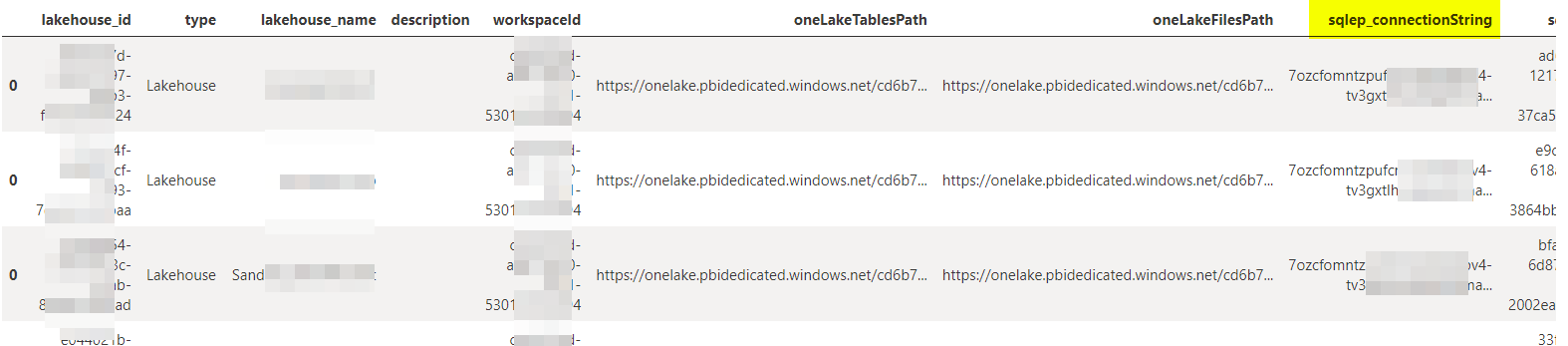
        'sqlep_connectionString': data['properties']['sqlEndpointProperties']['connectionString'],
        'sqlep_id': data['properties']['sqlEndpointProperties']['id'],
        'sqlep_provisioningStatus': data['properties']['sqlEndpointProperties']['provisioningStatus']
    }

    df = pd.DataFrame([flattened_data])

    # Column order
    column_order = [
        'lakehouse_id', 'type', 'lakehouse_name', 'description', 'workspaceId',
        'oneLakeTablesPath', 'oneLakeFilesPath',
        'sqlep_connectionString',
        'sqlep_id',
        'sqlep_provisioningStatus',
        'abfsPath'
    ]
    df = df[column_order]

    return df

lakehouse_properties("<lakehouse_name>")
To get properties of all lakehouses in a workspace:
df = pd.concat([lakehouse_properties(lh) for lh in fabric.list_items(type="Lakehouse")['Display Name']])
About the author
Principal Program Manager, Microsoft Fabric CAT helping users and organizations build scalable, insightful, secure solutions. Blogs, opinions are my own and do not represent my employer.
Comments
Join the discussionNo comments yet. Be the first to comment.